
Description
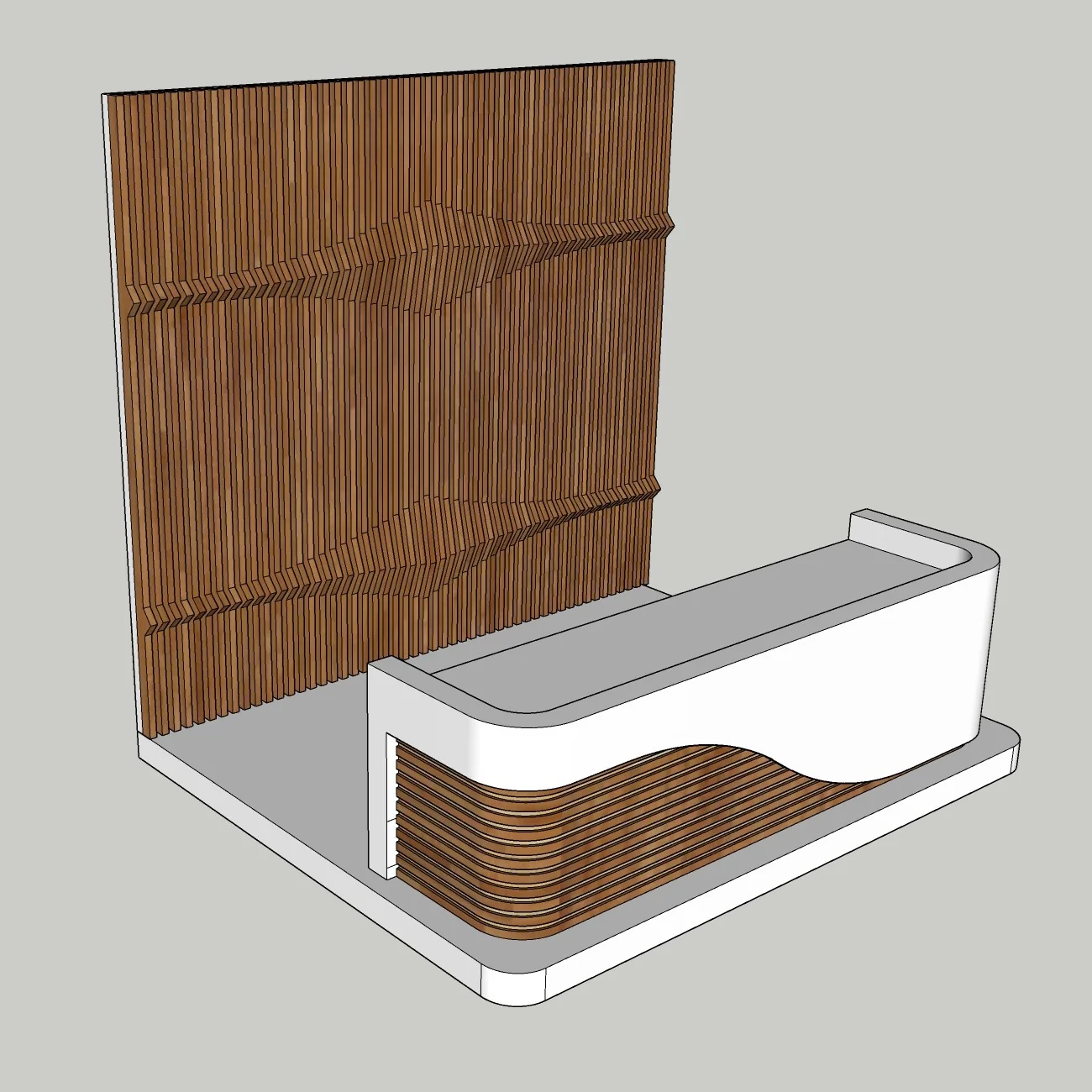
This premium modern wall-mounted console table SketchUp model is designed for high-end contemporary interiors where clean geometry and functional design come together. The combination of a feature wall and a matching console table creates a strong visual focal point, making it ideal for living rooms, entrance areas, hallways, and professional architectural visualization projects.
Carefully structured for efficiency and flexibility, this model allows designers to quickly integrate it into real projects or presentation scenes. Whether you are working on client deliverables or building a high-quality portfolio, this asset provides a solid and professional foundation.
Design Concept
The design follows a modern minimalist approach with a strong emphasis on proportion, material contrast, and visual balance.
-
Smooth curved transitions between surfaces
-
Clean vertical panel composition for the feature wall
-
Integrated console table combining functionality and aesthetics
-
Suitable for luxury, modern, and contemporary interior styles
This type of composition is widely used in premium residential and commercial interiors to create elegant focal points.
Use Cases
This SketchUp model is ideal for:
-
Professional interior design presentations
-
Client visualization and concept development
-
Architectural rendering and scene creation
-
Portfolio-level visualization projects
-
Advanced AI rendering workflows
Its structure ensures smooth integration into both real-time and photorealistic rendering environments.
SketchUp Workflow & Model Quality
This model is built based on professional modeling standards:
-
Organized groups and components for easy editing
-
Optimized geometry for high performance
-
Real-world scale and accurate proportions
-
Fully editable materials and dimensions
-
Compatible with SketchUp 2018 and newer versions
The model is designed to be lightweight while maintaining a high level of detail, making it suitable for complex scenes and high-end visualization.
Rendering Tips
To achieve the best visual results:
-
Use soft warm lighting to enhance depth and surface details
-
Apply high-quality materials such as wood, stone, or matte finishes
-
Add subtle shadows beneath the console table for realism
-
Use professional rendering engines such as D5 Render, V-Ray, or Lumion
This model also performs exceptionally well in AI-assisted rendering workflows, enabling the creation of cinematic-quality interior visuals.
Explore More & Learn
Expand your workflow and access additional resources:
👉 SketchUp 3D Models Library
https://www.nicetowers.com/sketchup-3d-models
👉 SketchUp Workflow Tutorials
https://nicetowers.com/sketchup-workflow
👉 AI Rendering with SketchUp
https://nicetowers.com/sketchup-ai-rendering
👉 Online SketchUp Courses
https://nicetowers.com/online-sketchup-courses
FAQ
Is this model fully editable?
Yes, all components and materials are fully customizable.
Which SketchUp version is supported?
This model is compatible with SketchUp 2018 and newer versions.
Is this model suitable for rendering?
Yes, it is optimized for both real-time and photorealistic rendering.
Can this model be used in professional projects?
Yes, it is designed specifically for professional architectural and interior visualization use.
Related SketchUp models
Wall-Mounted Console Tables with Arched Panels – Modern Interior Feature Wall SketchUp Model (Free) · Modern Wall Console Shelf 3D Model | SketchUp 2018
Reviews
There are no reviews yet.