
SketchUp Course Premium – Premium Duo
NICE TOWER ACADEMY · LIVE ONLINE TRAINING
The SketchUp Course Premium combines structured live training with a focused two-student format. Architects, interior designers and beginners can develop practical modeling skills while sharing the experience with one learning partner. The small class creates more room for questions, instructor feedback and discussion of the choices that make a model easier to revise and present.
Table of Contents
SketchUp Course Premium: class details
Premium Duo costs $250 per student, or $500 for the two-student class. Training begins once both students are confirmed. The shared course foundation includes 16 live sessions, two sessions per week, practical projects and live guidance. This format also includes advanced SketchUp plugins, AI rendering workflows and two months of after-course support.
2 students
Premium Duo format with live instructor guidance.
$250 per person
Review the current enrollment page before booking.
16 live sessions
Two sessions per week with practical modeling exercises.
Two months of after-course support are listed for Premium Duo. Ask about the support process and scheduling before enrollment so you know how to submit questions or continue practicing after the live sessions. The VIP option has a different support period, while Standard focuses on the shared modeling foundation.
How the 16-session Premium Duo course is structured
Premium Duo is a live, instructor-led SketchUp course for two students. Its 16 sessions run twice per week over approximately two months, using Google Meet. The course covers practical project modeling, model organization, advanced plugins and AI rendering. One enrollment reserves the two-student class; training starts once both students are confirmed.
The listed project topics include interiors, exteriors, landscape work, furniture and architectural details. Groups, components, tags, scenes and materials support an organized model that can be revised and presented. The current enrollment information does not publish a fixed topic for each of the 16 sessions, so confirm the detailed lesson sequence and meeting times before booking rather than treating these topics as a guaranteed session-by-session timetable.
Project practice, feedback and after-course support
Use the project exercises to practice the tools demonstrated in the live meetings. Keep an editable SketchUp file, organize repeated objects as components and save scenes for reviewing the design. Bring specific modeling questions to the instructor and use feedback to refine the working model, not only the final image.
Premium Duo lists two months of support after the course. Confirm the support process before enrollment. Its two-student format differs from the private VIP course and the larger Standard group; the existing comparison and enrollment links below retain the terms for each option. No new start date, discount or additional support commitment is implied.
Is the SketchUp Course Premium right for you?
Choose Premium Duo if you want more instructor attention than the five-student class while learning with one partner. It can suit classmates, colleagues and designers working toward similar goals. If every session needs to focus exclusively on your own questions, compare the private format; if budget per student is your main priority, review Standard.
Compare class size and support as well as price. A lower price per student may be useful for a team, while private instruction can suit a learner with a specific workflow to improve. Read the full course comparison before choosing. For timetable questions, use the Nice Tower contact page before reserving a seat.
Review your progress during the SketchUp Course Premium
Use a short review checklist after each practice session. Check that the model has the intended units, that the main dimensions are correct and that repeated elements are components. Hide the furniture and decorative objects to inspect the architectural shell. Then turn the scene objects back on and look for overlaps, reversed faces or textures that are out of scale.
In the SketchUp Course Premium, useful progress means being able to explain and repeat the steps, not only producing a convincing image. Keep a note of one workflow improvement from each lesson. Save a before-and-after version when you reorganize a scene or fix a modeling issue, so you can see how the change affects editing and presentation.
Before the next SketchUp Course Premium session, select a clear question and prepare the relevant model view. Start with the simplest version that shows the issue. This makes feedback easier to apply and helps you build an independent working method for future interior, furniture or architectural projects.
Watch the SketchUp Course Premium introduction
Explore how Nice Tower connects SketchUp tutorials to portfolio-ready projects. This introduction helps you understand the practical learning approach before choosing a live class format.
Preview practical modeling topics
These public Nice Tower tutorials show examples of architectural modeling practice. Explore them before choosing the SketchUp Course Premium; the exact live lesson projects are confirmed with the instructor.
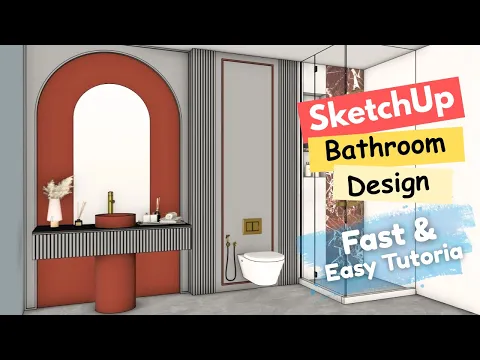
Modern bathroom modeling
Explore interior geometry, vanity details and a coordinated material palette.
Explore interior tutorials
Modern bedroom modeling
Practice room proportions, a feature wall and organized interior geometry.
Explore the bedroom projectPrepare for your SketchUp Course Premium
Have SketchUp available on the computer you plan to use, and ask which version is suitable for the class before purchasing software or installing extensions. Test your microphone and connection for live training. Keep a folder for lesson exercises, screenshots and saved model versions so you can locate the work you want to discuss.
Explore the free SketchUp tutorial library to become familiar with modeling topics. You can also watch lessons on the Nice Tower YouTube channel. These resources help you identify useful questions for guided training; they do not replace the live sessions or automatically include every project file shown in a video.
SketchUp Course Premium: questions before booking
How many sessions are included?
The shared course foundation includes 16 live sessions, with two sessions per week. Confirm the available timetable with Nice Tower before enrollment and allow time for practical exercises between lessons.
What support does this format include?
Two months of after-course support are listed for Premium Duo. Ask about the support process and scheduling before enrollment so you know how to submit questions or continue practicing after the live sessions. The VIP option has a different support period, while Standard focuses on the shared modeling foundation.
Does a linked tutorial include its model file?
A public tutorial does not automatically include a project download. Check the relevant video description or model listing for availability and any usage or purchase terms.
How do I reserve a SketchUp Course Premium place?
Open the enrollment page for Premium Duo, review the booking information and contact Nice Tower if you need scheduling clarification. Group formats begin when the required students are confirmed.