
SketchUp Course VIP – VIP Private
NICE TOWER ACADEMY · LIVE ONLINE TRAINING
The SketchUp Course VIP offers private, one-to-one live training for a learner who wants the sessions shaped around personal goals. Architects, interior designers, students and professionals switching to SketchUp can work through their questions with direct instructor guidance. A personalized plan connects your starting level to the modeling and presentation tasks you need to understand.
Table of Contents
SketchUp Course VIP: class details
VIP Private costs $400 total for one student. No learning partner is required. The course includes 16 live online sessions, two sessions per week, a personalized learning plan, advanced SketchUp workflows, AI rendering and professional plugins. The current plan also lists four months of full support after the course.
1 student
VIP Private format with live instructor guidance.
$400 total
Review the current enrollment page before booking.
16 live sessions
Two sessions per week with practical modeling exercises.
The VIP plan lists four months of full support after the course. Ask how follow-up questions are handled and what information to include when requesting help. A screenshot may explain the symptom, while an organized model and a short description of the steps can make feedback more useful.
Your SketchUp Course VIP learning workflow
Discuss your existing experience and the type of work you want to develop before scheduling. You may need to strengthen navigation and accurate geometry first, or you may already be comfortable with the basics and need help organizing complex architectural scenes. The personalized plan should reflect that starting point rather than assuming every learner has the same needs.
The SketchUp Course VIP connects clean modeling to a practical professional workflow. Work with groups, components, tags, scenes and materials, then review how model organization supports rendering and AI visualization. Keep experiments separate from the main file, and use consistent camera positions when comparing design options or preparing a portfolio presentation.
Practice between SketchUp Course VIP lessons
Bring a clear, manageable modeling goal to each practice exercise. This might be a room layout, a repeated facade detail or a scene that needs cleaner organization. Check dimensions and geometry before adding finishes. Note where you become stuck so private feedback can address the actual modeling step and help you repeat the process independently.
Save your working file with a clear project name and keep versions at important stages. Write down the tool, command or modeling step that caused difficulty, then bring that question to the next lesson. After receiving feedback, repeat the exercise without relying on the finished reference image. This turns a demonstration into a skill you can use on a different project.
Is the SketchUp Course VIP right for you?
Choose private training when individual questions, a specific project or your preferred pace need the instructor’s full attention. Session times should be agreed with Nice Tower according to availability. If you prefer to learn with another person, compare Premium Duo; if you want a larger team at a lower price per student, compare Standard.
Compare class size and support as well as price. A lower price per student may be useful for a team, while private instruction can suit a learner with a specific workflow to improve. Read the full course comparison before choosing. For timetable questions, use the Nice Tower contact page before reserving a seat.
Review your progress during the SketchUp Course VIP
Use a short review checklist after each practice session. Check that the model has the intended units, that the main dimensions are correct and that repeated elements are components. Hide the furniture and decorative objects to inspect the architectural shell. Then turn the scene objects back on and look for overlaps, reversed faces or textures that are out of scale.
In the SketchUp Course VIP, useful progress means being able to explain and repeat the steps, not only producing a convincing image. Keep a note of one workflow improvement from each lesson. Save a before-and-after version when you reorganize a scene or fix a modeling issue, so you can see how the change affects editing and presentation.
Before the next SketchUp Course VIP session, select a clear question and prepare the relevant model view. Start with the simplest version that shows the issue. This makes feedback easier to apply and helps you build an independent working method for future interior, furniture or architectural projects.
Watch the SketchUp Course VIP introduction
Explore how Nice Tower connects SketchUp tutorials to portfolio-ready projects. This introduction helps you understand the practical learning approach before choosing a live class format.
Preview practical modeling topics
These public Nice Tower tutorials show examples of architectural modeling practice. Explore them before choosing the SketchUp Course VIP; the exact live lesson projects are confirmed with the instructor.
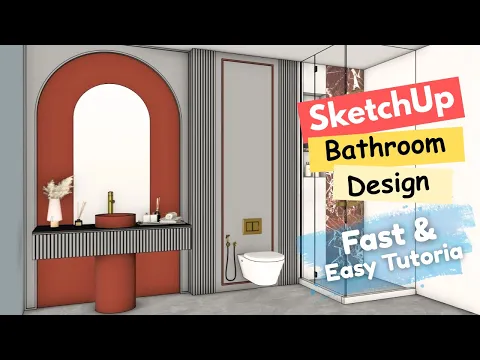
Modern bathroom modeling
Explore interior geometry, vanity details and a coordinated material palette.
Explore interior tutorials
Modern bedroom modeling
Practice room proportions, a feature wall and organized interior geometry.
Explore the bedroom projectPrepare for your SketchUp Course VIP
Have SketchUp available on the computer you plan to use, and ask which version is suitable for the class before purchasing software or installing extensions. Test your microphone and connection for live training. Keep a folder for lesson exercises, screenshots and saved model versions so you can locate the work you want to discuss.
Explore the free SketchUp tutorial library to become familiar with modeling topics. You can also watch lessons on the Nice Tower YouTube channel. These resources help you identify useful questions for guided training; they do not replace the live sessions or automatically include every project file shown in a video.
SketchUp Course VIP: questions before booking
How many sessions are included?
The shared course foundation includes 16 live sessions, with two sessions per week. Confirm the available timetable with Nice Tower before enrollment and allow time for practical exercises between lessons.
What support does this format include?
The VIP plan lists four months of full support after the course. Ask how follow-up questions are handled and what information to include when requesting help. A screenshot may explain the symptom, while an organized model and a short description of the steps can make feedback more useful.
Does a linked tutorial include its model file?
A public tutorial does not automatically include a project download. Check the relevant video description or model listing for availability and any usage or purchase terms.
How do I reserve a SketchUp Course VIP place?
Open the enrollment page for VIP Private, review the booking information and contact Nice Tower if you need scheduling clarification. Group formats begin when the required students are confirmed.