Nice Tower · Practical design guide
SketchUp AI Tools: Powerful Design Workflows 2026
SketchUp AI tools solve different design tasks. This workflow guide distinguishes concept generation, scene rendering and asset modeling so each input and output has a clear purpose in your project.
On this page
Artificial Intelligence is changing how designers work with SketchUp. With the right AI tools, you can generate 3D models from images, create realistic renders, improve materials, test design concepts, and speed up architectural visualization workflows.
This Nice Tower Academy guide brings together practical SketchUp AI tools, AI rendering training, SUAPP AI workflows, image-to-3D modeling methods, D5 visualization resources, Lumion rendering tutorials, and professional design learning paths for architects and creators.
AI Photo to 3D
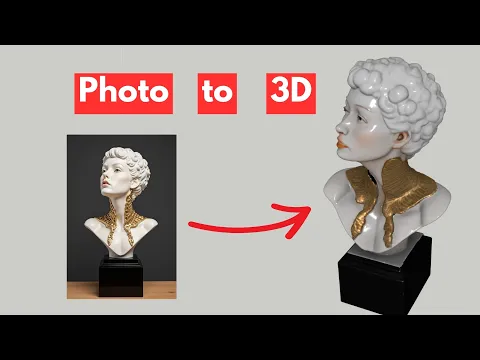
Learn how to transform reference images into editable 3D models and speed up your SketchUp modeling process.
AI Rendering
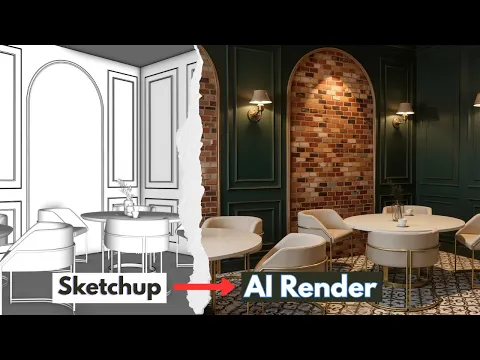
Use artificial intelligence to improve lighting, atmosphere, material quality and visual storytelling in architectural scenes.
AI Design Concepts
Explore ideas faster by generating design alternatives, concept visuals and presentation directions with AI tools.
Workflow Automation
Connect SketchUp, AI tools, rendering software and learning resources into one efficient production workflow.
What Are SketchUp AI Tools?
SketchUp AI tools are intelligent design solutions that help users automate, enhance or accelerate different parts of the 3D design process. These tools can support modeling, rendering, image generation, material improvement, concept development and architectural visualization.
For architects, interior designers, landscape designers and 3D artists, AI is especially useful because it reduces repetitive work and helps turn ideas into visual results much faster. Instead of spending hours on early-stage visual experiments, designers can test multiple options quickly and then refine the best direction inside SketchUp.
On Nice Towers, we focus on practical AI workflows that can be used in real projects, tutorial videos, SketchUp training, design presentations and professional visualization pipelines.
Featured SketchUp AI Tutorial Areas
Explore practical learning paths for AI rendering, image-to-3D modeling and architectural visualization. Choose a topic below to find tutorials and related resources.
Convert Photos into 3D Models
Learn how to use AI tools to transform a simple photo into an editable 3D model for SketchUp design workflows.
View SUAPP AI Tutorials →Improve Renders with AI
Explore AI rendering techniques for SketchUp, interior design, exterior visualization and architectural presentations.
Explore AI Rendering →Real-Time Visualization Workflow
Learn how SketchUp models can move into D5 workflows for faster visualization, lighting, materials and presentation.
Open D5 Workflow →Lumion Visualization Tutorials
Improve your architectural renders, animations, lighting and environment setup with structured Lumion tutorials.
View Lumion Training →Models for Practice & Projects
Download or explore SketchUp 3D models that support learning, project development and visualization practice.
Browse 3D Models →Plugins for Faster Modeling
Discover free SketchUp plugins and tools that can improve modeling speed, cleanup, design workflow and productivity.
Explore Free Plugins →Why AI Matters for SketchUp Users
SketchUp is already one of the fastest tools for architectural modeling and conceptual design. When AI is added to the workflow, it becomes even more powerful because designers can generate, test, improve and present ideas with less manual effort.
- Generate design ideas faster during early concept development
- Convert reference images into 3D design directions
- Improve lighting, materials and render quality with AI assistance
- Create better presentations for clients, students and social media
- Reduce repetitive modeling and visualization tasks
- Combine SketchUp, AI rendering, D5, Lumion and project files into one workflow
Best For
This SketchUp AI Tools guide is created for users who want to learn practical AI workflows instead of random tools without direction.
- Architects working on villas, interiors and commercial spaces
- Interior designers creating furniture, rooms and presentation visuals
- Landscape designers preparing outdoor scenes and concept models
- Students learning SketchUp, rendering and AI visualization
- 3D artists building faster content for YouTube, Instagram and client work
- Designers who want to connect AI tools with real SketchUp projects
Recommended AI Workflow for SketchUp
A strong AI workflow does not replace design skills. It supports the designer by speeding up technical steps, generating alternatives and improving visual communication. For best results, start with a clean SketchUp model, use AI tools for exploration, then refine the final output with professional modeling and rendering decisions.
Start with a clean SketchUp model
Use AI for concept or photo-to-3D generation
Refine geometry, scale and materials
Render with AI, D5, Lumion or other tools
Prepare final visuals for clients or tutorials
SUAPP AI for SketchUp
SUAPP AI is one of the important AI-powered tools for SketchUp users who want to explore image-to-3D modeling, AI-assisted design generation and faster creative workflows. It can help designers convert ideas into usable design directions and reduce the time needed for early modeling experiments.
Nice Tower Academy uses AI tools like SUAPP AI to demonstrate practical workflows for architects, designers and 3D enthusiasts. These tutorials show how AI can be used responsibly as part of a complete design process, from image reference to editable model and final visualization.
Nice Tower Learning Resources
Continue your learning with SketchUp tutorials, workflow guides, courses and project resources. Use the links below to explore the next step for your design work.
Why Learn AI Workflows with Nice Tower Academy?
Nice Tower Academy focuses on practical training for SketchUp users, architects, interior designers, visualization artists and students. Instead of only discussing tools, we focus on real design workflows that can be used in tutorials, client projects, social media content, 3D modeling practice and architectural presentations.
Our goal is to help designers learn faster, work smarter and produce better visual results using SketchUp, AI tools, rendering software, plugins and downloadable resources.
Rendering & image-to-3D workflows
SketchUp modeling and visualization
Training, tutorials and project resources
FAQ: SketchUp AI Tools
What are SketchUp AI tools?
SketchUp AI tools are artificial intelligence solutions that help with modeling, rendering, image-to-3D generation, design concepts, material improvement and visualization workflows for SketchUp users.
Can AI create 3D models from photos?
Yes. AI photo-to-3D tools can convert reference images into 3D design outputs that can be refined, customized and used as part of a SketchUp workflow.
Is AI rendering useful for architects and interior designers?
Yes. AI rendering helps architects and designers test lighting, materials, atmosphere and visual style faster, making it useful for presentations, concepts and social media content.
What is the best AI workflow for SketchUp?
A strong workflow starts with a clean SketchUp model, uses AI for concept exploration or image-to-3D modeling, then refines the output with proper geometry, materials, lighting and rendering tools.
Where can I learn SketchUp AI tutorials?
You can learn SketchUp AI workflows through Nice Tower Academy pages, YouTube tutorials, AI rendering training, SUAPP AI lessons, D5 workflow guides and Lumion rendering resources.
Start Building Smarter SketchUp Workflows with AI
Explore AI rendering, photo-to-3D modeling, SketchUp workflow training, D5 visualization, Lumion rendering and professional resources from Nice Tower Academy. Use this page as your starting point for learning modern AI-powered architectural design workflows.
Build a connected workflow without unnecessary tool switching
Assign one tool to each stage: a measured SketchUp model for geometry, a concept tool for alternative visual directions and an enhancement step for the selected presentation image. Save a checkpoint between stages and note which output becomes the input for the next tool. Compare Lupa enhancement with AIM asset generation only for the tasks they are designed to solve.
SketchUp AI Tools: follow a connected video workflow
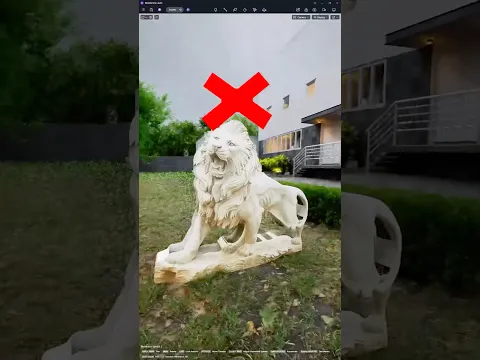
Practice three separate stages with these Nice Tower demonstrations: build an exploratory asset from a reference, visualize a prepared interior view and test image-to-3D generation for a D5 scene. Save a checkpoint between stages and inspect scale, geometry and design consistency before moving to the next tool.